Saturday, January 7, 2017

DI


Unity


// ui
   public class DIController : ApiController
   {
 
       /*
        -> techniq that helps to inject dependant objects to the class.
        -> why di
           -> reduce tide cupling. and be a losely cuple archi.
           -> core of decuppling in two layers are interface.
        */
 
       private ICustomer cus;
       public DIController(ICustomer _cus) {
           cus = _cus;
       }
       [HttpGet]
       public string Add()
       {
           cus.Add();
           return "added";
       }
   }
 
   // bl
 
   public interface ICustomer {
 
       void Add();
   }
 
   public class Customer:ICustomer
   {
       public string CustomerName { getset; }
 
       private IDal obj;
       public Customer(IDal iobj)
       {
           obj = iobj;
       }
       public void Add()
       {
           obj.Add();
 
       }
   }
 
   // dal
 
   public interface IDal
   {
       void Add();
   }
 
   public class SqlDal : IDal
   {
 
       public void Add()
       {
 
           Console.WriteLine("recode inserted to sql server");
       }
   }
 
   public class OracleDal : IDal
   {
 
       public void Add()
       {
 
           Console.WriteLine("recode inserted to oracle server");
       }
 
   }

public static class WebApiConfig
    {
        public static void Register(HttpConfiguration config)
        {
            // Web API configuration and services
            // Configure Web API to use only bearer token authentication.
            config.SuppressDefaultHostAuthentication();
            config.Filters.Add(new HostAuthenticationFilter(OAuthDefaults.AuthenticationType));
 
            // Web API routes
            config.MapHttpAttributeRoutes();
 
            config.Routes.MapHttpRoute(
                name: "DefaultApi",
                routeTemplate: "api/{controller}/{action}/{id}",
                defaults: new { id = RouteParameter.Optional }
            );
 
            var container = new UnityContainer();
            container.RegisterType<IDalSqlDal>(new HierarchicalLifetimeManager());
            container.RegisterType<IDalOracleDal>(new HierarchicalLifetimeManager());
            container.RegisterType<ICustomerCustomer>(new HierarchicalLifetimeManager());
            config.DependencyResolver = new UnityResolver(container);
        }
    }

///////////////////////////////////////////////////

namespace DependancyInjections.App_Start
{
    public class UnityResolver : IDependencyResolver
    {
        protected IUnityContainer container;
 
        public UnityResolver(IUnityContainer container)
        {
            if (container == null)
            {
                throw new ArgumentNullException("container");
            }
            this.container = container;
        }
 
        public object GetService(Type serviceType)
        {
            try
            {
                return container.Resolve(serviceType);
            }
            catch (ResolutionFailedException)
            {
                return null;
            }
        }
 
        public IEnumerable<object> GetServices(Type serviceType)
        {
            try
            {
                return container.ResolveAll(serviceType);
            }
            catch (ResolutionFailedException)
            {
                return new List<object>();
            }
        }
 
        public IDependencyScope BeginScope()
        {
            var child = container.CreateChildContainer();
            return new UnityResolver(child);
        }
 
        public void Dispose()
        {
            container.Dispose();
        }
    }
 
}


Friday, November 11, 2016

Caching

Cache Output


Install-Package Strathweb.CacheOutput.WebApi2

1
[CacheOutput(ClientTimeSpan = 600, ServerTimeSpan = 600)]

In my example,  I am telling it to cache the results for both client and server-side for 600 sec (10 min).  There isn’t a whole lot of science behind choosing 10 minutes, and I could have written some fancy code to figure out when my scheduled job ran last but I wanted to keep it simple.

Example

using WebApi.OutputCache.V2;

public class CacheTestController : ApiController
    {
        [HttpGet]
        [CacheOutput(ClientTimeSpan = 100, ServerTimeSpan = 100)]
        public string CacheTest123()
        {
            Thread.Sleep(5000);
            return "google";
        }
 
        [HttpGet]
        public string CacheTest1234()
        {
            Thread.Sleep(5000);
            return "google";
        }
    }

Sunday, October 30, 2016

Database transactions


Database transaction with deferent function

private static bool UpdateFacility(int id,string name)
        {
            using (var con = DatabaseInfo.WebServiceConnectionFactory)
            {
                con.Open();
                using (var transaction = con.BeginTransaction())
                {

                    try
                    {
                      UpdateFirst(id,name, con, transaction);
     UpdateSecond(id,name, con, transaction);
      transaction.commit();
                    }
                    catch  
                    {
                        transaction.Rollback();
                         throw;

                    }
                }
            }
 }
 
 private static void UpdateFirst(int id,string name, IDbConnection con, IDbTransaction transaction){
 
try{
con.Execute('update quary',transaction);
}catch{throw;}
 
 }
 
 private static void UpdateSecond(int id,string name, IDbConnection con, IDbTransaction transaction){
 try{
con.Execute('update quary',transaction);
}catch{throw;}
 
 }

Wednesday, October 12, 2016

THREADING AND TASKS


Task.Run


private void button1_Click(object sender, EventArgs e)
        {
            int first=0, second = 0;
            var taskList = new List<Task>();
            taskList.Add(Task.Run(() =>
            {
                first = PrintOne(10,20);
            }));
            taskList.Add(Task.Run(() =>
            {
                second = PrintTwo(30,40);
            }));
            Task.WaitAll(taskList.ToArray());
            MessageBox.Show((first+second).ToString());
        }

        int PrintOne(int i, int k)
        {
            Thread.Sleep(5000);
            return i + k;
        }

        int PrintTwo(int i, int k)
        {
            Thread.Sleep(5000);
            return i + k;
        }


Backgroud workers


BackgroundWorker m_oWorker;

        private void button2_Click(object sender, EventArgs e)
        {
            m_oWorker = new BackgroundWorker();
            m_oWorker.DoWork += new DoWorkEventHandler(m_oWorker_DoWork);
            m_oWorker.RunWorkerCompleted += new RunWorkerCompletedEventHandler(m_oWorker_RunWorkerCompleted);
            m_oWorker.WorkerReportsProgress = true;
            m_oWorker.WorkerSupportsCancellation = true;
            m_oWorker.RunWorkerAsync();
        }

        private string a = "";
        void m_oWorker_DoWork(object sender, DoWorkEventArgs e)
        {
            Thread.Sleep(5000);
            a = "Done :)";
        }

        void m_oWorker_RunWorkerCompleted(object sender, RunWorkerCompletedEventArgs e)
        {
            MessageBox.Show(a);
        }


Multiple tasks


 var task = new List<Task>();
                    task.Add(Task.Run(() =>
                    {
                        EventData();
                    }));
                    task.Add(Task.Run(() =>
                    {
                        if (!string.IsNullOrWhiteSpace(userid))
                        {
                            SubAccountParticipants();
                        }
                    }));

                    Task.WaitAll(task.ToArray());

Threading file copy 


  void Copy(object o) {

            Console.WriteLine(o.ToString());
            Thread.Sleep(1000);
        }

        bool IsStop = false;
        int count = 0;
        //start
        private void button1_Click(object sender, EventArgs e)
        {
            Console.WriteLine("start coping");
            IsStop = false;
            List<string> lst = new List<string>();
            for (int i = 0; i < 10; i++)
            {
                lst.Add("files " + i);
            }

            Thread t = new Thread(new ThreadStart(() =>
            {
                while (count < lst.Count && !IsStop)
                {

                    Copy(lst[count]);
                    count++;
                }
            }));

            t.Start();
            t.Join();
            Console.WriteLine("stop coping");
        }
        //stop
        private void button2_Click(object sender, EventArgs e)
        {
            IsStop = true;
        }

Task With List


var lst = new List<string>(2000);
         var t1 = Task.Run(() =>
         {
             for (int i = 0; i < 500; i++)
             {
 
                 lst.Add($"thread 1 - {i}");
                 Thread.Sleep(100);
 
             }
 
         });
 
         var t2 = Task.Run(() =>
         {
             for (int i = 0; i < 500; i++)
             {
 
                 lst.Add($"thread 2 - {i}");
                 Thread.Sleep(100);
 
 
             }
 
         });
 
         Task.WaitAll(t1, t2);
         Console.WriteLine("End");
         Console.Read();

Tuesday, July 12, 2016

IIS

Using Custom Domains With IIS Express


For Visual Studio 2015 the steps in the above answers apply but the applicationhost.config file is in a new location. in your "solution" folder follow the path, this is confusing if you upgraded and would have TWO versions of applicationhost.config on your machine.

\.vs\config
Within that folder you will see your applicationhost.config file

Alternatively you could just search your solution folder for the .config file and find it that way.

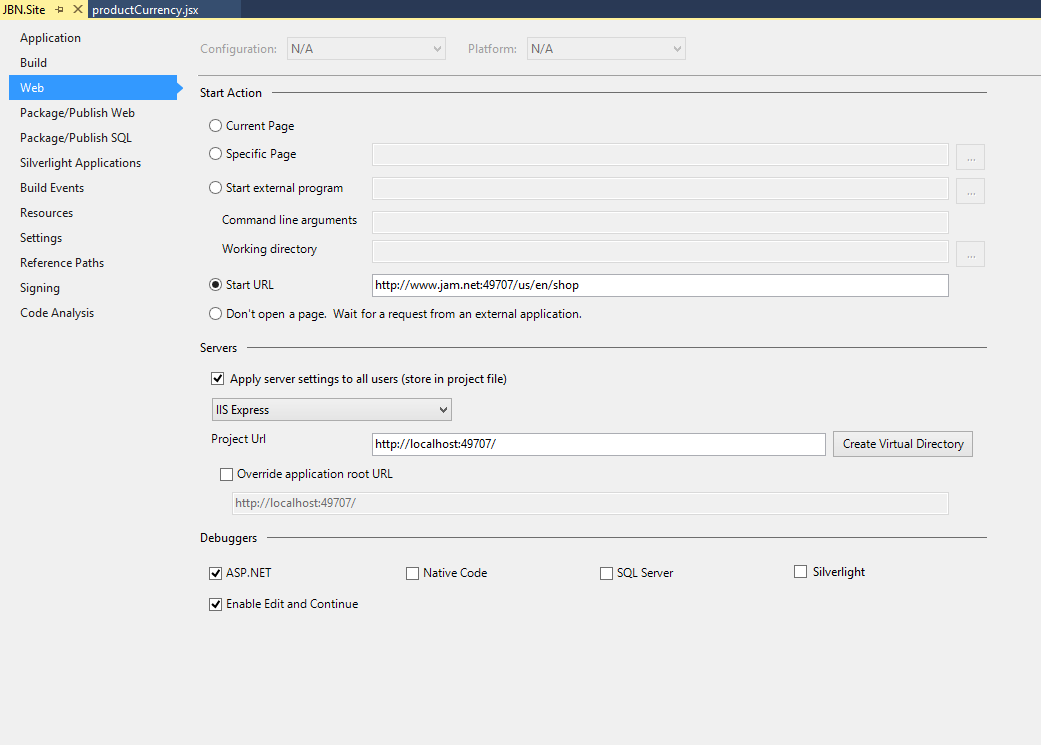
I personally used the following configuration:

enter image description here

With the following in my hosts file:

127.0.0.1       jam.net
127.0.0.1       www.jam.net
And the following in my applicationhost.config file:

<site name="JBN.Site" id="2">
    <application path="/" applicationPool="Clr4IntegratedAppPool">
        <virtualDirectory path="/" physicalPath="C:\Dev\Jam\shoppingcart\src\Web\JBN.Site" />
    </application>
    <bindings>
        <binding protocol="http" bindingInformation="*:49707:" />
            <binding protocol="http" bindingInformation="*:49707:localhost" /> 
    </bindings>
</site>
Remember to run your instance of visual studio 2015 as an administrator! If you don't want to do this every time I recomend this:

How to Run Visual Studio as Administrator by default

I hope this helps somebody, I had issues when trying to upgrade to visual studio 2015 and realized that none of my configurations were being carried over.

http://i.stack.imgur.com/1IQXV.png


Monday, July 11, 2016

Jquary Animation - beautiful

Show and hide nicely 

('input[name="isMultiple"]').on('click', this.toggleMultiple.bind(this));
  toggleMultiple(e) {
            const checked = $(e.target).is(':checked');
            if (checked) {
                $('#multipleDay').animateTo('flipInX');
                $('#singleDay').addClass('hidden');
    }
            else {
               $('#multipleDay').addClass('hidden');
               $('#singleDay').animateTo('flipInX');
            }
        },

used Animate.css

Sql server row level policy